Online SMART Recovery: Virtual Meeting Guide
Online SMART Recovery meetings explained: how to find one, what happens, and how to join your first virtual session with confidence.
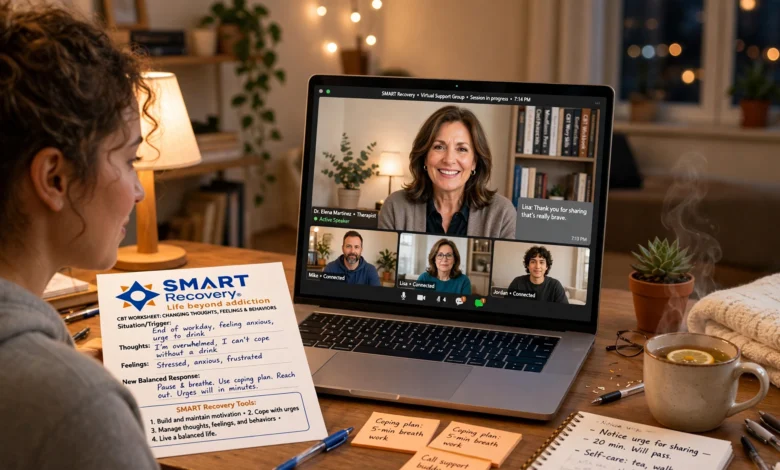
Online SMART Recovery meetings have quietly become one of the most practical ways to get support for addictive behaviors without leaving your house. If you’ve been searching for a recovery group that doesn’t require a car, a babysitter, or a Sunday drive across town, a virtual SMART Recovery meeting might be exactly what you’re looking for.
This guide walks through everything you need to know about online SMART Recovery: what the meetings actually look like, how the science-based 4-Point Program translates to a screen, where to find a meeting that fits your schedule, and what to expect the first time you log in. Whether you’re brand new to recovery support groups or you’ve done in-person meetings before and want to try the virtual version, this is written to answer the practical questions people actually have before they click “join.”
SMART Recovery (Self-Management and Recovery Training) has been around since 1994, and it’s grown into a global network with thousands of meetings, a large share of them now held entirely online. That growth isn’t an accident. Online meetings solve real problems: geography, scheduling conflicts, mobility issues, and, for a lot of people, the simple discomfort of walking into a room full of strangers. A screen can lower that barrier significantly.
By the end of this article, you’ll know exactly how to find a meeting, what the format looks like, and how to make the most of your first virtual session.
What Is SMART Recovery, Exactly?
Before diving into the online format, it helps to understand what SMART Recovery is and isn’t. It’s a free, secular, peer-support program for people working through addictive behaviors, whether that’s alcohol, drugs, gambling, shopping, food, or internet use. Unlike 12-step programs, SMART Recovery doesn’t ask participants to identify as an “addict” for life or rely on a higher power. Instead, it’s built around a self-empowerment model and four core tools known as the 4-Point Program:
- Building and maintaining motivation
- Coping with urges
- Managing thoughts, feelings, and behaviors
- Living a balanced life
Meetings, whether online SMART Recovery sessions or in-person groups, are led by trained volunteer facilitators, not therapists, and they follow a structured format that mixes brief check-ins, tool discussion, and open conversation. According to <cite index=”4-1″>SMART’s own materials, participants use the program to assume responsibility for their own recovery and become empowered through the 4-Point Program</cite>, which covers motivation, urge coping, and balanced living.
Why Choose Online SMART Recovery Meetings
There’s a reason virtual meetings have exploded in popularity. Here’s what makes online SMART Recovery appealing for so many people.


Convenience and Accessibility
The most obvious benefit is that you can join from anywhere with a decent internet connection. No commute, no parking, no arranging childcare around a fixed location. For people juggling work shifts, caregiving responsibilities, or a lack of reliable transportation, this alone can be the difference between attending a meeting and skipping it entirely.
More Meeting Options, More Often
Because online SMART Recovery meetings aren’t tied to a physical room, you’re not limited to whatever’s available in your zip code. You can attend a meeting hosted by a group across the country, at a time that actually fits your day, rather than waiting for the one local meeting on Thursday nights.
A Gentler Entry Point
For a lot of newcomers, the idea of walking into a room and introducing yourself to strangers is the biggest barrier to getting help. Online SMART Recovery softens that. You can turn your camera off if you’re not ready to be seen, and it’s completely normal to attend a few sessions before you say anything at all.
Consistency Across Time Zones and Life Changes
If you move, travel, or your schedule shifts, an online meeting habit doesn’t have to break. You keep the same login process and, often, the same familiar facilitators and group members, even if your physical location changes.
How Online SMART Recovery Meetings Actually Work
If you’ve never attended one, the mechanics are simpler than you’d think.
The Platforms Used
Most groups run their virtual SMART Recovery meetings through Zoom, though some use Microsoft Teams or similar video conferencing tools. As the organization explains, <cite index=”1-1″>most online meetings use Zoom, while some use Microsoft Teams or similar services, so you’ll want those apps downloaded on your device before joining</cite>. You don’t need a paid account for any of these platforms; a free version works fine for joining a meeting someone else has scheduled.
National vs. Local Online Meetings
SMART Recovery’s meeting directory (SMARTfinder) separates meetings into local and national listings. As the meeting finder notes, <cite index=”2-1″>national meetings are online SMART Recovery meetings open to participants from anywhere, rather than being tied to a specific local community, and some focus on shared experiences or populations while others are open to all</cite>. That means you can pick a general meeting or one tailored to something more specific, like a group for women, veterans, LGBTQ+ participants, family members, or people managing a particular behavior.
The 4-Point Program in a Virtual Setting
The content of an online SMART Recovery meeting mirrors an in-person one almost exactly. Facilitators guide discussion around one or more of the four points, and participants share what’s working, what’s not, and what tools they’re leaning on that week. The main difference is just the delivery: you’re looking at a grid of video tiles (or a mostly-audio call) instead of a circle of chairs.
How to Find an Online SMART Recovery Meeting
Finding a meeting takes about five minutes once you know where to look.
Step 1: Use the Official Meeting Finder
SMART Recovery maintains an official directory called SMARTfinder. Per the organization’s help documentation, <cite index=”2-1″>SMARTfinder displays all public meetings within 50 miles of your search location by default, including online, in-person, and national meetings, and you can use filters to narrow results to the meeting type that fits your needs</cite>.
Step 2: Filter for “Online” or “National”
Once you’re in the finder, filter results down to online-only or national meetings if you want the widest selection, or search by city if you’d prefer a group with a local, familiar community feel that happens to meet virtually.
Step 3: Click “Join Now”
According to the meeting finder’s guidance, <cite index=”2-1″>to join an online meeting, click on the meeting you’d like to attend from the search results, which opens the full listing where you’ll typically find a Join Now button, and meetings can usually be joined a few minutes before the scheduled start time</cite>. If there’s no visible button, check the meeting notes section for a link or dial-in instructions.
Step 4: Consider the SMART Recovery App
If you’d rather not search on a browser every time, there’s a dedicated app. As the organization states, <cite index=”1-1″>you can download the SMART Recovery app to search for and join meetings from your favorite device</cite>. It’s a useful shortcut once you know which meetings you tend to attend regularly.
What to Expect at Your First Online SMART Recovery Meeting
Walking in blind is the part that makes people the most nervous, so here’s a realistic preview.
Meeting Length and Structure
Most sessions run 60 to 90 minutes. They typically open with a brief welcome from the facilitator, followed by a check-in round, then a discussion built around whichever tool or topic the group is focused on that day. Meetings usually close with a short wrap-up, sometimes including a summary of key takeaways or a reminder of the next session.
The Check-In Isn’t Mandatory
New participants often assume they have to introduce themselves and explain their situation right away. That’s not the case. In SMART Recovery’s own guidance for newcomers, they note that <cite index=”4-1″>meetings often start with a check-in that includes a brief introduction, but you’re not obligated to check in, and it’s important to know you don’t have to talk at all during the meeting if you’re not comfortable doing so</cite>.
No Religious or Spiritual Framework
If you’ve tried 12-step programs and found the spiritual language off-putting, this is worth knowing upfront. <cite index=”4-1″>SMART Recovery believes the power to change addictive behaviors resides within each individual and does not depend on adherence to any spiritual viewpoint</cite>. The tone is closer to a skills-based workshop than a confession or testimony.
Cameras, Names, and Privacy
You can typically join using a first name only or even a nickname, and keeping your camera off is generally accepted, especially for your first few sessions. Facilitators are used to a mix of participants who are fully visible and others who prefer to stay off-camera or just listen.
Step-by-Step: How to Join a Virtual SMART Recovery Meeting
Here’s the full process from start to finish, in order:
- Go to the SMART Recovery meeting finder (or open the app) and search by location, or filter for online/national meetings.
- Browse the schedule and pick a meeting time and format that realistically fits your week; consistency matters more than picking the “perfect” group.
- Download the required app (Zoom or Teams, depending on the meeting) ahead of time so you’re not troubleshooting software five minutes before the meeting starts.
- Click the meeting listing, then look for the Join Now button or check the meeting notes for a direct link.
- Log in a few minutes early, since most meetings open shortly before the scheduled start time.
- Decide on your camera and name settings, keeping in mind you’re free to stay off-camera and use a first name only.
- Participate at your own pace, whether that means fully engaging in discussion or just listening for your first session.
Tips for a Successful Online SMART Recovery Experience
A few small adjustments make virtual meetings noticeably better.
Set Up Your Space in Advance
- Find a quiet, private spot where you won’t be interrupted mid-conversation.
- Use headphones if you’re in a shared household; it improves both your privacy and audio quality for everyone else.
- Test your camera and microphone before the meeting starts, not during it.
Treat It Like a Real Appointment
- Block the time on your calendar the same way you would a doctor’s visit.
- Avoid multitasking during the session. It’s tempting to answer emails in the background, but you’ll get far less out of the meeting.
- Show up even when you don’t feel like talking. Passive attendance still counts, and it keeps the habit intact.
Meeting Etiquette Worth Knowing
- Mute yourself when you’re not speaking to reduce background noise for the group.
- Use the chat function if the platform allows it, especially if you want to share something without interrupting.
- Respect the confidentiality of what other participants share. What’s discussed in the meeting stays in the meeting.
Try a Few Different Groups
Not every facilitator or group dynamic will feel like a fit right away. It’s completely normal to try two or three different online SMART Recovery meetings before settling into one that feels like home.
Common Challenges With Online Meetings (and How to Handle Them)
Virtual meetings aren’t perfect, and it helps to know the common friction points ahead of time.
- Tech issues. Video freezes, audio cuts out, links expire. Keep the meeting’s contact information handy so you can message a facilitator if you get locked out.
- Distractions at home. If your space isn’t private, consider whether a walk-and-listen approach (audio only, camera off) works better for you than trying to find a quiet room.
- Feeling disconnected. Some people find it harder to build rapport through a screen. Sticking with the same meeting weekly, rather than hopping between different ones, tends to help this settle over time.
- Meeting capacity. Popular national meetings can fill up. As the meeting finder notes, <cite index=”2-1″>because some national meetings are especially popular, they may occasionally fill to capacity</cite>, so it’s worth having a backup meeting time in mind.
Online SMART Recovery vs. In-Person Meetings
Both formats follow the same 4-Point Program and use the same tools, so the core content doesn’t change. The differences are mostly practical:
| Factor | Online Meetings | In-Person Meetings |
|---|---|---|
| Access | Any location with internet | Limited to local venues |
| Privacy | Camera-off option available | Face-to-face visibility |
| Selection | Local, national, and specialty groups | Usually limited to local groups |
| Connection | Can feel less personal for some | Often stronger in-room rapport |
| Scheduling | Wider range of times across time zones | Fixed local schedule |
Many people in SMART Recovery actually use both, attending an in-person group when possible and filling in gaps with online sessions when travel, weather, or scheduling gets in the way.
Beyond Meetings: Other Online SMART Recovery Resources
Online SMART Recovery isn’t limited to live video meetings. There’s a broader ecosystem worth knowing about:
- Message boards and 24/7 chat rooms. These give you a place to connect with the community outside of scheduled meeting times.
- SMART Recovery Online (SROL). A dedicated online community offering additional structured support, message boards, and chat access, generally requiring a free account.
- The SMART Recovery app. Useful not just for finding meetings but also for accessing recovery tools and tracking urges between sessions.
- Podcasts and handbooks. Optional supplementary material that reinforces what’s covered in meetings, though nothing is required to participate.
Is Online SMART Recovery Right for You?
If you want flexibility, a lower-pressure entry point, and a program grounded in practical tools rather than spiritual language, online SMART Recovery is worth trying. It’s free, it doesn’t require a long-term commitment, and there’s no downside to attending a session just to see how it feels. If the virtual format doesn’t end up being your preference, the same organization runs in-person meetings using an identical framework, so switching formats later doesn’t mean starting over.
For readers who want to go deeper into the evidence behind peer-support and mutual-aid recovery approaches, resources from the National Institute on Alcohol Abuse and Alcoholism offer research-backed context on how different recovery pathways compare, and SAMHSA’s National Helpline is a good place to start if you need broader guidance on treatment options alongside a support group like SMART Recovery.
Conclusion
Online SMART Recovery meetings give people a genuinely practical way to build recovery support into a real, busy life, without the added pressure of travel, unfamiliar rooms, or rigid schedules. The format follows the same evidence-based 4-Point Program used in every SMART Recovery meeting worldwide, just delivered through Zoom, Teams, or similar video tools, and finding one takes only a few minutes through the official meeting finder or app.
Whether you’re brand new to recovery support or looking for a more flexible alternative to in-person groups, trying a single virtual session, camera on or off, is a low-risk way to find out if it fits your life. Recovery doesn’t have to start with a big leap. Sometimes it starts with clicking “Join Now.”